Langfuse exporter
Koog emits agent traces using OpenTelemetry, an open standard for observability data. To send those traces to Langfuse, Koog includes a built-in OpenTelemetry exporter — no manual instrumentation required.
Once connected, Langfuse's OpenTelemetry support lets you visualize, analyze, and debug how your agents interact with LLMs, tools, and external APIs.
Setup instructions
- Create a Langfuse project using the setup guide.
- Get your
public keyandsecret keyfrom Organization Settings > API Keys. - Provide the host, public key, and secret key — either as parameters to
addLangfuseExporter(), or via environment variables:
   export LANGFUSE_HOST="https://cloud.langfuse.com"
   export LANGFUSE_PUBLIC_KEY="<your-public-key>"
   export LANGFUSE_SECRET_KEY="<your-secret-key>"
Configuration
Install the OpenTelemetry feature and call addLangfuseExporter() to enable Langfuse export.
Basic example
fun main() = runBlocking {
    val agent = AIAgent(
        promptExecutor = promptExecutor,
        llmModel = OpenAIModels.Chat.GPT4oMini,
        systemPrompt = "You are a code assistant. Provide concise code examples."
    ) {
        install(OpenTelemetry) {
            addLangfuseExporter()
        }
    }

    println("Running agent with Langfuse tracing")

    val result = agent.run("Tell me a joke about programming")
    println("Result: $result\nSee traces on the Langfuse instance")
}
public static void main(String[] args) {
    var agent = AIAgent.builder()
        .promptExecutor(promptExecutor)
        .llmModel(OpenAIModels.Chat.GPT4oMini)
        .systemPrompt("You are a code assistant. Provide concise code examples.")
        .install(OpenTelemetry.Feature, config ->
            LangfuseKt.addLangfuseExporter(config)
        )
        .build();

    System.out.println("Running agent with Langfuse tracing");

    var result = agent.run("Tell me a joke about programming");
    System.out.println("Result: " + result + "\nSee traces on the Langfuse instance");
}
Trace attributes
When Koog sends agent activity to Langfuse, it does so as a series of spans — individual records of work, such as an LLM call or a tool execution. Related spans are grouped into a trace, which represents a complete agent run from start to finish.
addLangfuseExporter() accepts a traceAttributes parameter — a list of key-value pairs attached to the
root of each trace. These enable Langfuse-specific features such as sessions, environments, and tags, making it
easy to filter and group traces in the Langfuse UI.
For the full list of supported attributes, see Langfuse OpenTelemetry docs.
Common attributes to include:
- Session ID (
langfuse.session.id): Groups related traces for aggregated metrics, cost analysis, and scoring - Environment (
langfuse.environment): Isolates production traces from development and staging - Tags (
langfuse.trace.tags): Labels traces with feature names, experiment IDs, or customer segments (array of strings)
Example with session and tags
fun main() = runBlocking {
    val sessionId = UUID.randomUUID().toString()

    val agent = AIAgent(
        promptExecutor = promptExecutor,
        llmModel = OpenAIModels.Chat.GPT4oMini,
        systemPrompt = "You are a helpful assistant."
    ) {
        install(OpenTelemetry) {
            addLangfuseExporter(
                traceAttributes = listOf(
                    CustomAttribute("langfuse.session.id", sessionId),
                    CustomAttribute("langfuse.trace.tags", listOf("chat", "kotlin", "production"))
                )
            )
        }
    }

    println("Running agent with Langfuse tracing")

    // Multiple runs with the same session ID will be grouped in Langfuse
    agent.run("What is Kotlin?")
    agent.run("Show me a coroutine example")
}
Note
Setting traceAttributes from Java is currently not supported because the underlying Kotlin function carries a kotlin.time.Duration parameter (a value class) that causes JVM-name mangling on all overloads including parameters after it. Use the Kotlin example above when you need traceAttributes.
What gets traced
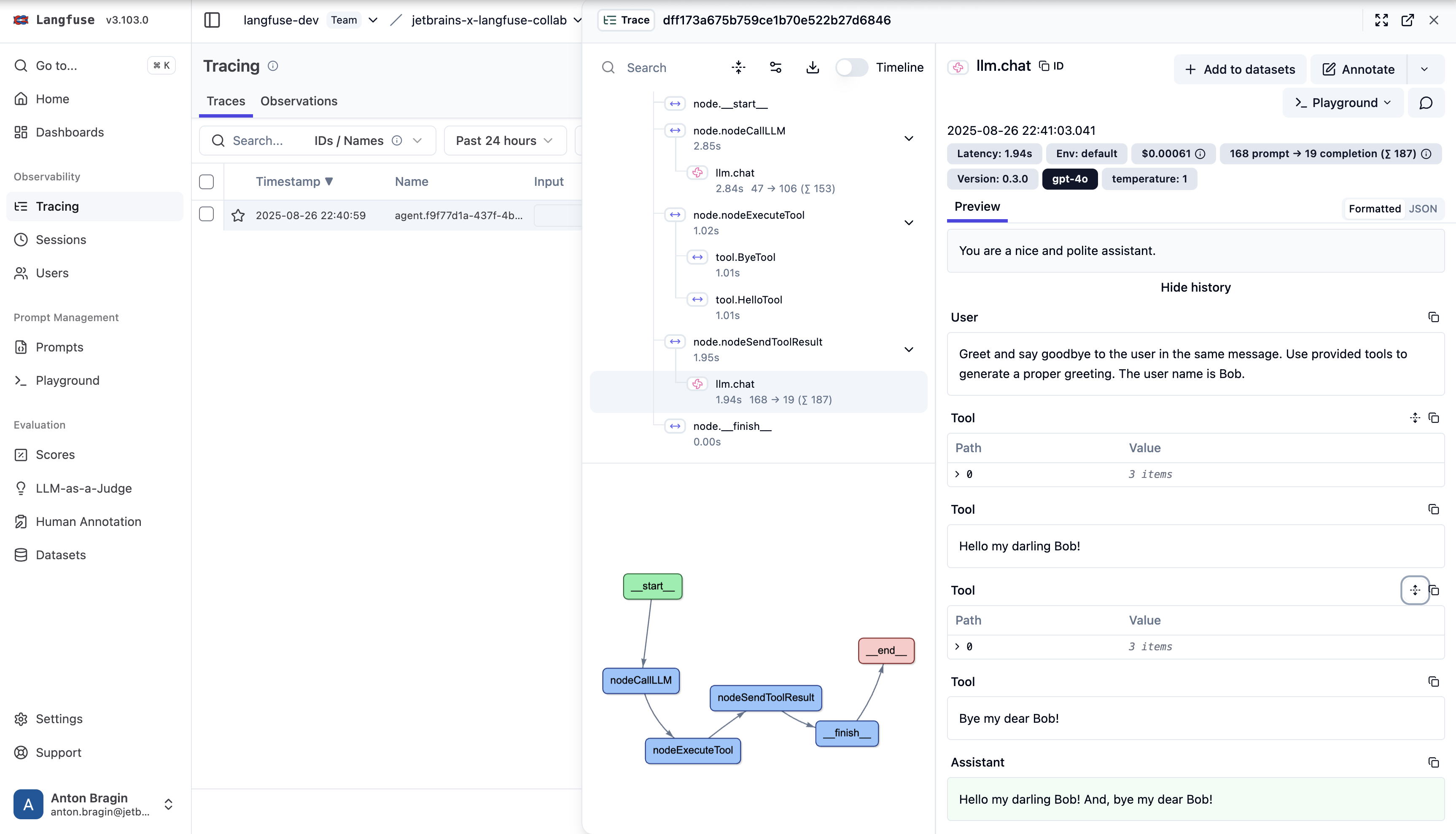
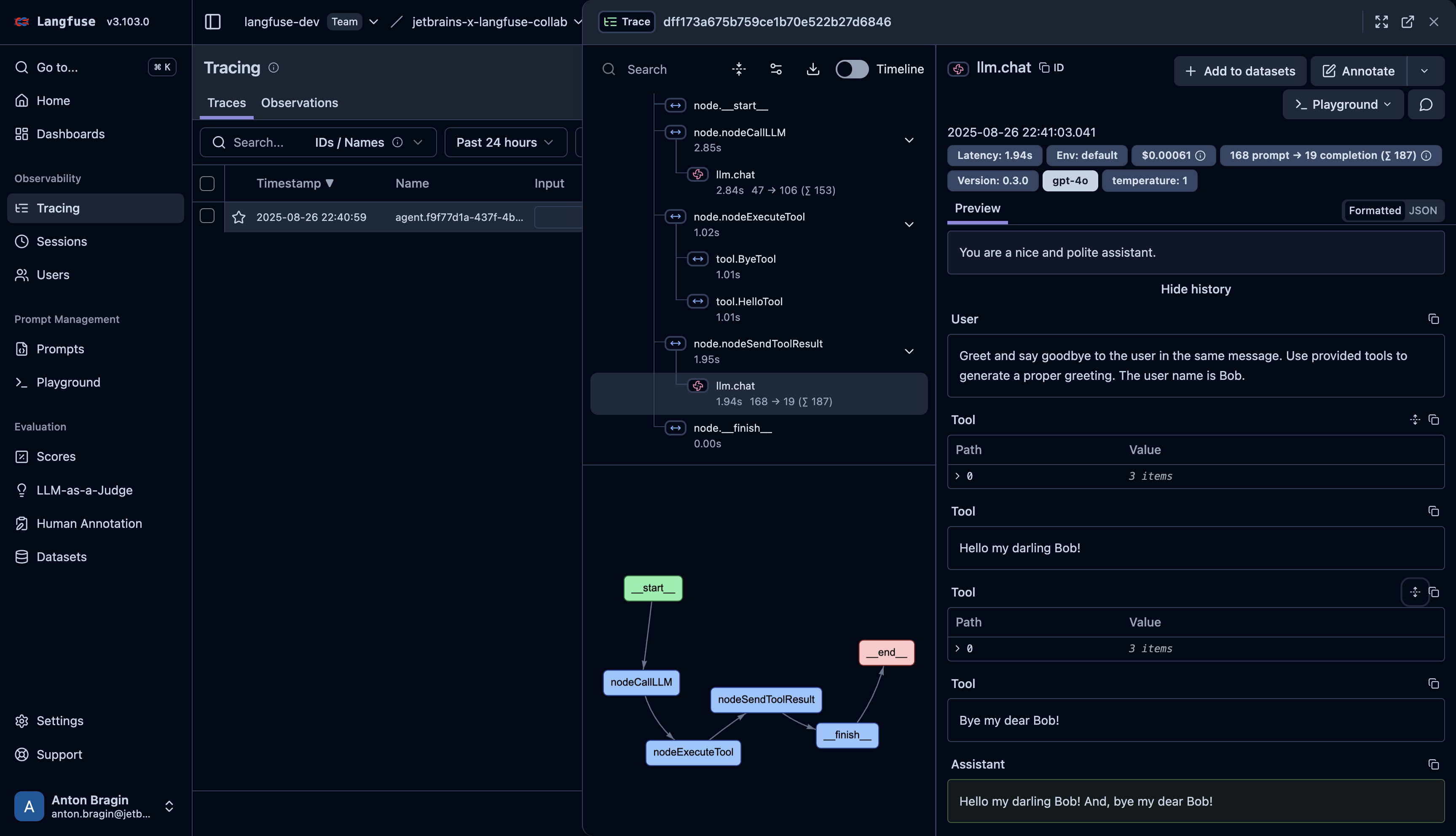
The Langfuse exporter captures the same activity as Koog’s general OpenTelemetry integration. It also captures span attributes required by Langfuse to show Agent Graphs.
For the full list of captured spans and how to include LLM prompt and response content, see What gets traced.
When visualized in Langfuse, the trace appears as follows:
For more details on Langfuse OpenTelemetry tracing, see:
Langfuse OpenTelemetry Docs.
Troubleshooting
- No traces: confirm
LANGFUSE_HOST,LANGFUSE_PUBLIC_KEY, andLANGFUSE_SECRET_KEYare set, and that the key pair belongs to the correct project. - Connection issues: if running self-hosted Langfuse, confirm
LANGFUSE_HOSTis reachable from your environment.
For general troubleshooting, see Troubleshooting.